Valorant Stretched Resolution changer
A downloadable tool
Z7LLres V2
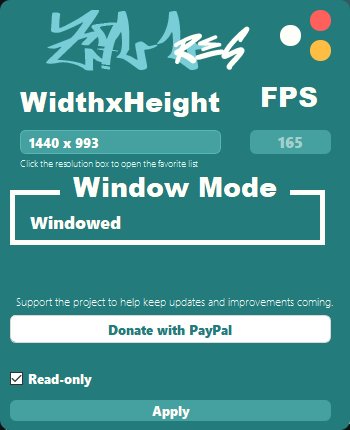
Z7LLres is a lightweight Windows utility built to make stretched resolution setup for VALORANT faster, easier, and more convenient. Instead of manually searching through config folders and editing .ini files by hand, the app gives you a simple interface that helps apply supported stretched resolutions in a clean and organized way.
The goal of Z7LLres is to save time, reduce manual setup, and give players a practical tool for managing their preferred resolution settings with less hassle.
Features
- Clean and simple desktop interface.
- Built-in stretched resolution selection.
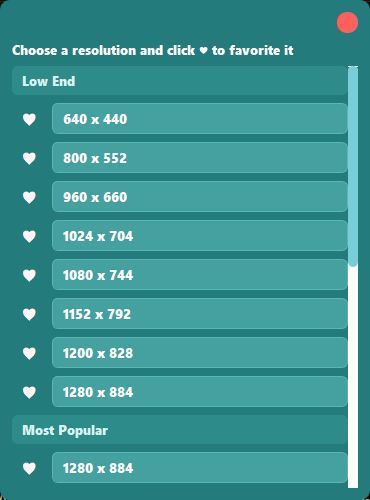
- Favorite resolution system for faster access.
- Automatic detection of the correct VALORANT config path.
- Automatic editing of GameUserSettings.ini.
- Applies the selected width and height values automatically.
- Sets FullscreenMode=2 for the intended windowed behavior in this build.
- Disables dynamic resolution and letterboxing settings when applying changes.
- Handles read-only mode for the config file.
- Includes a support button for users who want to help fund future updates.
How It Works
When you click Apply, Z7LLres reads the local Riot configuration, checks the active user from RiotLocalMachine.ini, finds the matching VALORANT user config folder, opens the correct GameUserSettings.ini file, updates the necessary resolution settings, applies the required values, and restores read-only mode afterward.
Who This Is For
This app is for players who want a quicker and cleaner way to manage stretched resolutions without manually editing files every time. It is especially useful for users who prefer a straightforward tool focused on one main job: applying the right settings with less effort.
Important Notes
- Designed for Windows.
- Built around the local VALORANT configuration structure used by the app.
- Some functions may require administrator permissions depending on your system setup.
- Use responsibly and always double-check your settings before launching the game.
Support Development
Z7LLres is a passion project that continues to grow over time. If you choose to support it, your contribution helps me maintain this project, improve stability, add new features, fix issues, and continue creating more useful projects in the future.
Thank you to everyone who downloads the app, uses it, shares feedback, or supports its development. Your support genuinely helps keep the project active and improving.
Download
Install instructions
== How to use ==
1. Download the file below.
2. Launch "Z7LLres.exe".
3. Finish the installation process and launch Z7LLres.
4. Choose your desired stretched resolution inside the app.
5. Click "Apply" to write the selected values to the VALORANT config.
6. Open NVIDIA Control Panel.
7. Go to "Change resolution".
8. If the resolution does not already exist, click "Customize" and create the same resolution you selected in Z7LLres.
9. Apply that resolution in NVIDIA Control Panel.
10. Go back to Z7LLres and click the white button to disable the monitor.
11. Open VALORANT.
12. Enjoy.
== Updates ==
v2.0.0 (current) - Initial release of Z7LLres
== Credits ==
Developer: Z7LL
Color scheme inspiration: Z7LL
Background image credits: Z7LL
Development log
- Z7LLres V2 — Now Targeting Valorant 🎯13 hours ago
Leave a comment
Log in with itch.io to leave a comment.